Your Team Is Talking. But Are They Communicating?
Most teams today are not short on tools. They have Slack for chat, email for updates, WhatsApp for quick messages, and Zoom for calls. Yet somehow, things still fall through the cracks.
Team communication tools are software applications that allow team members to collaborate, share information, and manage tasks in real-time or asynchronously. In 2026, the best team communication tools like Slack, Microsoft Teams, and Airchannel.ai help reduce ‘app fatigue’ by unifying internal chat and external customer messages into a single, organized workflow.
This guide covers the 10 best team communication tools for 2026, how to pick the right ones, and how to build a simple stack that actually works.
The ‘Too Many Tools’ Problem and How to Fix It
There is a real cost to switching between apps all day. Research from the University of California found that every context switch costs around 23 minutes of focused work. For a team member toggling between Slack, email, Zoom, and a project board, that adds up fast.
The result is what operations teams call communication noise. Everyone is busy, but important things keep getting missed. Customers wait longer than they should. Internal decisions get repeated three times across three different platforms.
Question batching is one of the simplest fixes. Instead of sending five separate messages throughout the day, you collect your questions and send one structured message with everything in it. This cuts notification fatigue, speeds up replies, and signals to your team that your communication is organized and intentional.
The second fix is choosing team communication tools that actually connect to each other. Fewer apps, better integrated, beat more apps running in silos every time.
What to Look for Before You Choose
Not every tool deserves a place in your stack. Before adding anything new, ask these four questions.
Does it reduce or add noise? A tool that creates more notifications is making the problem worse, not better.
Is it sync or async? Sync tools like Zoom require everyone to be present at the same time. Async tools like Loom or Notion let people respond on their own schedule. You need both but for different jobs.
Does it connect to your other tools? A team communication tool that sits in its own silo will eventually become shelfware.
Will your team actually use it? A tool with a steep learning curve has a low adoption rate. Low adoption means low ROI.
The 10 Best Team Communication Tools for 2026
1. Airchannel.ai — Best for Unified Customer and Team Communication
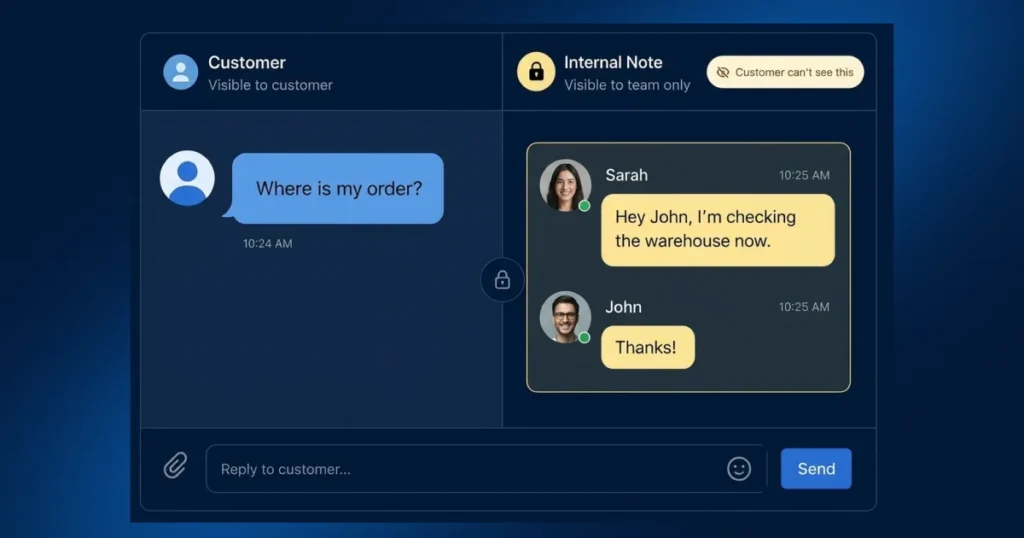
Airchannel.ai is primarily a customer-facing platform, but it earns the top spot on this list because of what it does for internal teams.
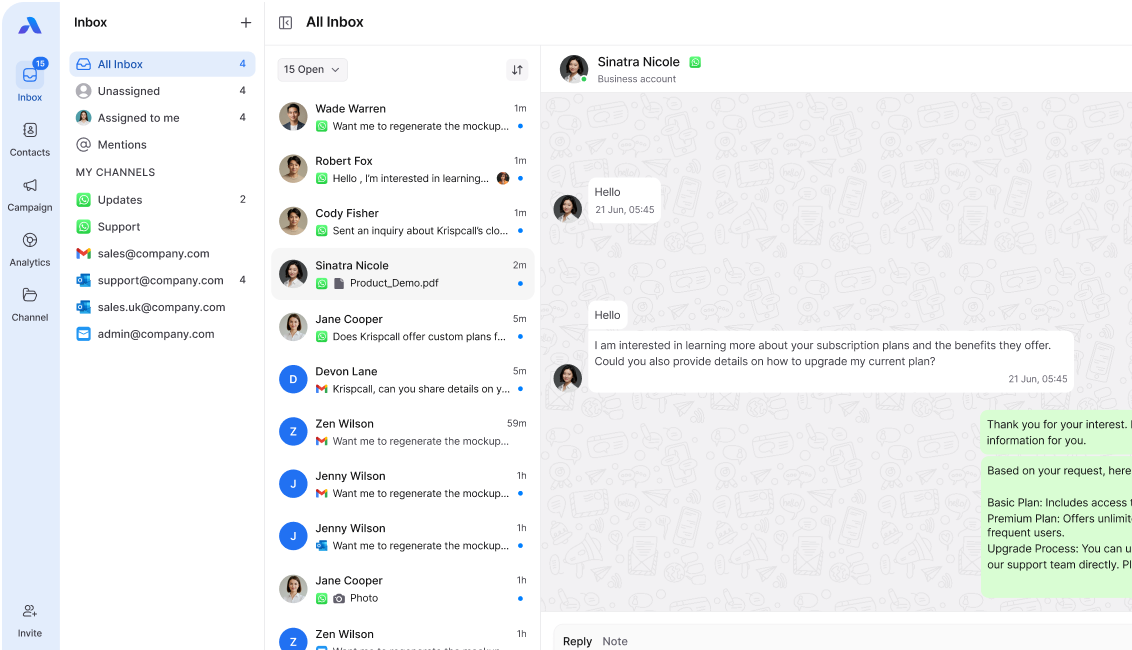
When a customer message arrives on WhatsApp, SMS, or email, the whole team can see it, comment on it, and collaborate on the response inside one shared inbox. No more forwarding email threads. No more “did anyone reply to this?” moments in Slack.
The AI layer handles Tier-1 queries automatically. When a human needs to step in, the agent gets the full conversation history. Internal notes sit right next to the customer thread so coordination happens in context, not in a separate app.
For teams that communicate with customers daily, Airchannel.ai removes the biggest source of noise: the gap between your internal team chat and your external customer messages.
Best for: Customer-facing teams that want to collaborate on responses without switching between a helpdesk and an internal chat tool.
Key features: Unified WhatsApp, SMS, and email inbox. Internal team notes. AI triage and routing. Human-in-the-loop escalation. Template library.
2. Slack — Best for Real-Time Internal Chat
Slack remains the standard for real-time team communication. Channels keep conversations organized by topic. Threads stop discussions from flooding the main feed. Workflow automation handles repetitive notifications.
Best for: Day-to-day internal coordination and quick decision-making.
Key features: Channels, threads, workflow builder, Huddles for quick audio calls, and deep integrations with tools like Zendesk, Notion, and ClickUp.
Watch out for: Slack becoming a dump for every notification from every other tool. Set strict channel rules early.
3. Microsoft Teams — Best for Enterprise-Scale Communication
Teams is the natural choice if your business already runs on Microsoft 365. It handles video calls, chat, and file collaboration in one place, all connected to Outlook, SharePoint, and OneDrive.
Best for: Larger organizations standardized on the Microsoft ecosystem.
Key features: Video meetings, persistent chat, file sharing, and direct integration with Microsoft 365 apps.
Watch out for: The interface can feel heavy for smaller teams that just need a simple chat tool.
4. Zoom — Best for Structured Video Meetings
Zoom is still the most reliable option for client-facing video calls, team standups, and scheduled meetings. The AI Companion feature now generates meeting summaries automatically, which solves the classic problem of decisions made in a call never reaching the people who missed it.
Best for: Scheduled meetings, client calls, and team training sessions.
Key features: Video calls, webinars, AI-generated summaries, breakout rooms, and recording with transcription.
Pro tip: Send the Zoom AI summary to your team in Slack within 30 minutes of every meeting. It takes 10 seconds and keeps everyone aligned.
5. Loom — Best for Async Video Updates
Loom lets you record a short screen-and-camera video and share it with a link. For explaining a complex process, walking through a document, or giving feedback on a design, a two-minute Loom beats a five-paragraph email every time.
Best for: Remote teams that need to share context without scheduling a call.
Key features: Screen and camera recording, viewer analytics, comment threads, and CRM integrations.
6. WhatsApp Business — Best for Fast Team and Customer Messaging
WhatsApp is already where most people communicate personally. WhatsApp Business brings structure to that with verified profiles, quick reply templates, and broadcast lists. For teams with field staff or global operations, it keeps communication fast and familiar.
Best for: Field teams, global operations, and businesses where customers expect WhatsApp as a contact option.
Note: For managing WhatsApp at scale alongside SMS and email, Airchannel.ai handles the unified inbox, so your team is not managing WhatsApp separately from everything else.
7. ClickUp — Best for Task and Project Management
ClickUp is where work gets assigned, tracked, and completed. It is not a messaging tool in the traditional sense, but it belongs in every team communication stack because decisions made in chat need to become tasks somewhere. ClickUp closes that gap.
Best for: Teams that need to convert discussions into action items and track progress in one place.
Key features: Tasks, docs, goals, time tracking, Gantt charts, and integrations with Slack and Zoom.
8. Notion — Best for Shared Knowledge and Documentation
Notion is your team’s second brain. Meeting notes, SOPs, onboarding docs, and strategy pages all live here. When a new team member joins, Notion is where they go to understand how things work. When a process changes, Notion is where the update lives.
Best for: Documentation, wikis, and async collaboration on written content.
Key features: Flexible pages, databases, templates, and integrations with Slack and ClickUp.
9. Google Workspace — Best for Document Collaboration
Docs, Sheets, Slides, and Meet work together seamlessly, and most people already know how to use them. For teams that live in shared documents and need reliable video calls, Google Workspace covers both without a steep learning curve.
Best for: Small to mid-size teams that need reliable document collaboration and video calls.
10. Lark — Best for All-in-One Teams on a Budget
Lark combines chat, video, docs, project management, and email into one platform. It is a strong option for startups and growing teams that want to reduce the number of tools without giving up functionality.
Best for: Early-stage teams that want to consolidate as much as possible into one affordable platform.
Top 5 Tools Compared
| Tool | Primary Goal | Best For… | Sync or Async? |
| Airchannel.ai | Unified customer and team inbox | Customer-facing teams managing WhatsApp, SMS, and email | Both |
| Slack | Real-time internal chat | Day-to-day team coordination | Sync |
| Zoom | Scheduled video meetings | Client calls and team standups | Sync |
| Loom | Async video messaging | Remote teams sharing context without calls | Async |
| Notion | Documentation and knowledge sharing | Team wikis, SOPs, and meeting notes | Async |
The 3-Tool Starter Stack for Small Businesses
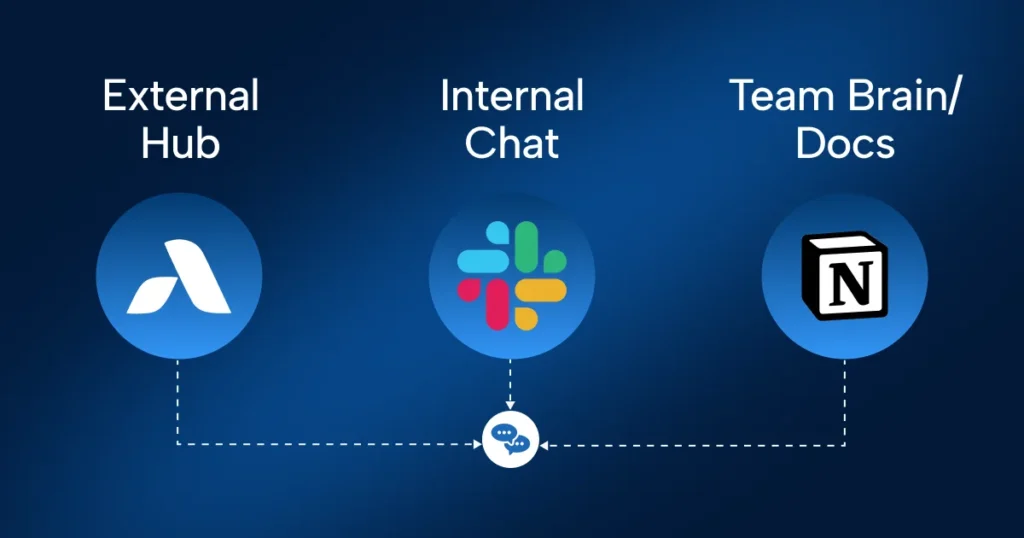
You do not need 10 tools. If you are a small business or a growing team, start here and add only when you have a clear reason to.
Tool 1: Airchannel.ai for all customer-facing communication. WhatsApp, SMS, and email in one inbox. Your team collaborates on responses without switching apps. The AI handles the repetitive stuff so your team focuses on the conversations that need a human.
Tool 2: Slack for internal team chat. Keep it simple. One channel per project. One channel for company-wide updates. Turn off notifications you do not need.
Tool 3: Notion for documentation. Every decision, process, and update lives here. New team members can get up to speed without pinging three people on Slack.
That is it. Those three team communication tools cover real-time internal chat, async documentation, and customer-facing communication. Everything else can wait until you have a specific problem that one of these three cannot solve.
Final Thoughts
The goal of better team communication tools is not to add more places to check. It is to give your team one clear place for each type of conversation.
Customer messages belong in Airchannel.ai. Internal chat belongs in Slack. Knowledge belongs in Notion. When everyone knows where to look, things stop falling through the cracks.
For more on managing the channels your customers use, read our guide to customer communication channels. And if you want a full strategy for how your team should be talking to customers, start with our guide on how to communicate with your customers.
Ready to cut the noise and unify your customer communication?
Try Airchannel.ai and give your team one inbox for WhatsApp, SMS, and email. Get started today.